ShortcutPosters

Make your XCOM: Enemy Unknown controls poster

Pick the keybinds that matter, add your own, tune the colours and style — then download a free personalized PNG.

Making a poster for:
Style
Accent
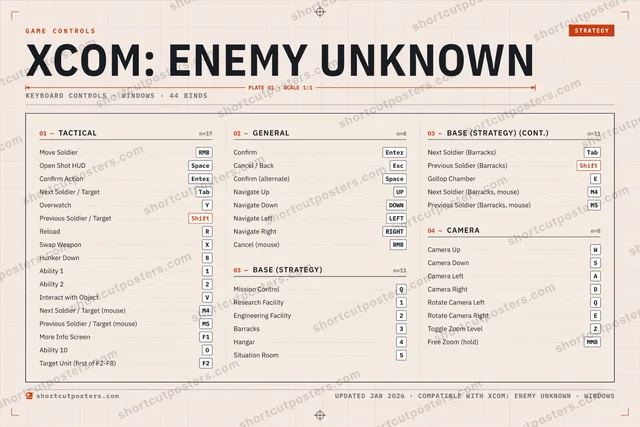
01 —TACTICALn=17Move SoldierRMBOpen Shot HUDSpaceConfirm ActionEnterNext Soldier / TargetTabOverwatchYPrevious Soldier / TargetShiftReloadRSwap WeaponXHunker DownBAbility 11Ability 22Interact with ObjectVNext Soldier / Target (mouse)M4Previous Soldier / Target (mouse)M5More Info ScreenF1Ability 100Target Unit (first of F2-F8)F202 —GENERALn=8ConfirmEnterCancel / BackEscConfirm (alternate)SpaceNavigate UpUPNavigate DownDOWNNavigate LeftLEFTNavigate RightRIGHTCancel (mouse)RMB03 —BASE (STRATEGY)n=11Mission ControlQResearch Facility1Engineering Facility2Barracks3Hangar4Situation Room503 —BASE (STRATEGY) (CONT.)n=11Next Soldier (Barracks)TabPrevious Soldier (Barracks)ShiftGollop ChamberENext Soldier (Barracks, mouse)M4Previous Soldier (Barracks, mouse)M504 —CAMERAn=8Camera UpWCamera DownSCamera LeftACamera RightDRotate Camera LeftQRotate Camera RightEToggle Zoom LevelZFree Zoom (hold)MMBGAME CONTROLSSTRATEGYXCOM: ENEMY UNKNOWNPLATE 01 · SCALE 1:1KEYBOARD CONTROLS · WINDOWS · 44 BINDSshortcutposters.comUPDATED JAN 2026 · COMPATIBLE WITH XCOM: ENEMY UNKNOWN · WINDOWSshortcutposters.comshortcutposters.comshortcutposters.comshortcutposters.comshortcutposters.comshortcutposters.comshortcutposters.comshortcutposters.comshortcutposters.comshortcutposters.comshortcutposters.comshortcutposters.comshortcutposters.comshortcutposters.comshortcutposters.comshortcutposters.comshortcutposters.comshortcutposters.comshortcutposters.comshortcutposters.comshortcutposters.comshortcutposters.comshortcutposters.comshortcutposters.comshortcutposters.comshortcutposters.comshortcutposters.comshortcutposters.comshortcutposters.comshortcutposters.comshortcutposters.comshortcutposters.comshortcutposters.comshortcutposters.comshortcutposters.comshortcutposters.comshortcutposters.comshortcutposters.comshortcutposters.comshortcutposters.comshortcutposters.comshortcutposters.comshortcutposters.comshortcutposters.comshortcutposters.comshortcutposters.comshortcutposters.comshortcutposters.comshortcutposters.comshortcutposters.comshortcutposters.comshortcutposters.comshortcutposters.comshortcutposters.comshortcutposters.comshortcutposters.comshortcutposters.comshortcutposters.comshortcutposters.comshortcutposters.comshortcutposters.comshortcutposters.comshortcutposters.comshortcutposters.comshortcutposters.comshortcutposters.comshortcutposters.comshortcutposters.comshortcutposters.comshortcutposters.comshortcutposters.comshortcutposters.comshortcutposters.comshortcutposters.comshortcutposters.comshortcutposters.comshortcutposters.comshortcutposters.comshortcutposters.comshortcutposters.comshortcutposters.comshortcutposters.comshortcutposters.comshortcutposters.comshortcutposters.comshortcutposters.comshortcutposters.comshortcutposters.comshortcutposters.comshortcutposters.comshortcutposters.comshortcutposters.comshortcutposters.comshortcutposters.comshortcutposters.comshortcutposters.comshortcutposters.comshortcutposters.comshortcutposters.comshortcutposters.comshortcutposters.comshortcutposters.comshortcutposters.comshortcutposters.comshortcutposters.comshortcutposters.comshortcutposters.comshortcutposters.comshortcutposters.comshortcutposters.comshortcutposters.com

Hover to locate · click on the poster to disable · drag to reorder categories & shortcuts · ✎ to rename a category

Free PNG $0
  • Web resolution (1600 px)
  • Light watermark
  • Instant download
Made to order
Custom print-ready PDF $2.99
  • 300 DPI, framed-quality — no watermark
  • Every standard print size
  • Built to order from the poster above — checkout link emailed to you

Trouble ordering? Email business@shortcutposters.com.

How it works

  1. 1

    Choose a style

    Start from the generative Arcade art, or switch to isometric keys, a typewriter list, a keyboard map, or an editorial print.

  2. 2

    Make it yours

    Set the accent colour and palette, rename categories, and reorder anything.

  3. 3

    Pick the controls

    Toggle exactly which keybinds appear — or add your own custom ones.

  4. 4

    Download or print

    Export a free high-resolution PNG instantly, or order a print-ready PDF.

Five styles to choose from
XCOM: Enemy Unknown controls poster preview
Arcade Generative art drawn from the game's genre and colour — pure geometry, zero spoilers.
XCOM: ENEMY UNKNOWNKEYBOARD SHORTCUTS · WINDOWS · 20 ESSENTIAL1Research F…2Engineerin…3Barracks4567890QMission Co…WCamera UpERReloadTYOverwatchUIOPACamera LeftSCamera D…DFGHJKLZXSwap Wea…CVBHunker Do…NMMORE SHORTCUTSMove SoldierRMBConfirmEnterCancel / BackEscOpen Shot HUDSpaceConfirm ActionEnterNext Soldier / TargetTabPrevious Soldier / Tar…ShiftConfirm (alternate)SpaceAbility 11shortcutposters.comUPDATED JAN 2026 · COMPATIBLE WITH XCOM: ENEMY UNKNOWN · WINDOWS
Keyboard map Every binding labelled on a realistic QWERTY or AZERTY keyboard.
TACTICALMove SoldierRMBOpen Shot HUDSpaceConfirm ActionEnterNext Soldier / TargetTabOverwatchYPrevious Soldier / TargetShiftReloadRSwap WeaponXHunker DownBAbility 11CAMERACamera UpWCamera DownSCamera LeftAGENERALConfirmEnterCancel / BackEscConfirm (alternate)SpaceBASE (STRATEGY)Mission ControlQResearch Facility1Engineering Facility2Barracks3XCOM: Enemy UnknownKEYBOARD SHORTCUTS · WINDOWS · 20 ESSENTIALBOTH LAYOUTSQWERTYQWERTYAZERTYAZERTYshortcutposters.comUPDATED JAN 2026 · COMPATIBLE WITH XCOM: ENEMY UNKNOWN · WINDOWS
Isometric Shortcuts on a 3D isometric keyboard — bold and poster-like.
GENERAL03ConfirmEnterCancel / BackEscConfirm (alternate)SpaceBASE (STRATEGY)04Mission ControlQResearch Facility1Engineering Facility2Barracks3CAMERA03Camera UpWCamera DownSCamera LeftATACTICAL10Move SoldierRMBOpen Shot HUDSpaceConfirm ActionEnterNext Soldier / TargetTabOverwatchYPrevious Soldier / TargetShiftReloadRSwap WeaponXHunker DownBAbility 11XCOM: Enemy UnknownKEYBOARD SHORTCUTS · WINDOWS · 20 ESSENTIALBOTH LAYOUTSQWERTYQWERTYAZERTYAZERTYshortcutposters.comUPDATED JAN 2026 · COMPATIBLE WITH XCOM: ENEMY UNKNOWN · WINDOWS
Typewriter A clean printed list, grouped by category — dense and legible.
XCOM: ENEMY UNKNOWN · KEYBOARD SHORTCUTSWindows · 4 SETS · No.01XCOM: ENEMY UNKNOWNTOTAL20SHORTCUTSFOR WINDOWS · SHIPPED COMBOSSETSTACTICAL10GENERAL03BASE (STRATEG04CAMERA03REF. EDITION · JAN 2026shortcutposters.comMove SoldierRMBOpen Shot HUDSpaceConfirm ActionEnterNext Soldier / TargetTabOverwatchYPrevious Soldier / TargetShiftReloadRSwap WeaponXHunker DownBAbility 11ConfirmEnterCancel / BackEscConfirm (alternate)SpaceMission ControlQResearch Facility1Engineering Facility2Barracks3Camera UpWCamera DownSCamera LeftA
Editorial A bold Swiss-style print: giant wordmark, dense keycap columns, and a totals rail.

Frequently asked questions

Is the XCOM: Enemy Unknown controls poster maker free?

Yes — design your XCOM: Enemy Unknown keybinds poster and download it as a free, watermarked PNG. A print-ready PDF (PC / keyboard edition) is an optional paid upgrade.

Can I choose which XCOM: Enemy Unknown controls appear?

Yes. Toggle any keybind on or off, reorder them, rename categories, and add your own custom binds.

Which styles can I use?

Start from the Arcade style — generative art based on the game's genre — or switch to the isometric, typewriter, keyboard-map or editorial layouts, and pick your accent colour.

Does the poster use official XCOM: Enemy Unknown artwork?

No. The poster is built only from the keybinds, text and abstract generated shapes — never logos, covers, screenshots or key art.