ShortcutPosters

Make your Hearts of Iron IV controls poster
Pick the keybinds that matter, add your own, tune the colours and style — then download a free personalized PNG.

Making a poster for:
Style
Accent
01 —GAME SPEEDn=3Pause / ResumeSpaceIncrease Game Speed+Decrease Game Speed−02 —UIn=6Research WindowWGovernment WindowQDecisions WindowShiftQTrade WindowRLogistics WindowIInternational Market WindowE03 —PRODUCTION/CONSTRUCTI…n=3Construction WindowTProduction WindowYRecruit & Deploy WindowU04 —MILITARY/ORDERSn=6Create Front LineZCreate Offensive LineXCreate Fallback LineCMove / Diplomacy (Right Click)RMBCreate Garrison AreaVExercise Selected DivisionsK05 —CAMERA/MAP MODESn=9Pan CameraArrowsJump to CapitalBksp05 —CAMERA/MAP MODES (CONT.)n=9Default Map ModeF1Zoom InHomeZoom OutEndStrategic Navy Map ModeF2Strategic Air Map ModeF3Supply Map ModeF4Resource Map ModeF806 —SELECTIONn=2Assign Selection to GroupCtrl1Select Group107 —MISCn=2Toggle Interface (Screenshot)CtrlF9Save Map ImageCtrlF10GAME CONTROLSSTRATEGYHEARTS OF IRON IVPLATE 01 · SCALE 1:1KEYBOARD CONTROLS · WINDOWS · 31 BINDSshortcutposters.comUPDATED JAN 2026 · COMPATIBLE WITH HEARTS OF IRON IV · WINDOWSshortcutposters.comshortcutposters.comshortcutposters.comshortcutposters.comshortcutposters.comshortcutposters.comshortcutposters.comshortcutposters.comshortcutposters.comshortcutposters.comshortcutposters.comshortcutposters.comshortcutposters.comshortcutposters.comshortcutposters.comshortcutposters.comshortcutposters.comshortcutposters.comshortcutposters.comshortcutposters.comshortcutposters.comshortcutposters.comshortcutposters.comshortcutposters.comshortcutposters.comshortcutposters.comshortcutposters.comshortcutposters.comshortcutposters.comshortcutposters.comshortcutposters.comshortcutposters.comshortcutposters.comshortcutposters.comshortcutposters.comshortcutposters.comshortcutposters.comshortcutposters.comshortcutposters.comshortcutposters.comshortcutposters.comshortcutposters.comshortcutposters.comshortcutposters.comshortcutposters.comshortcutposters.comshortcutposters.comshortcutposters.comshortcutposters.comshortcutposters.comshortcutposters.comshortcutposters.comshortcutposters.comshortcutposters.comshortcutposters.comshortcutposters.comshortcutposters.comshortcutposters.comshortcutposters.comshortcutposters.comshortcutposters.comshortcutposters.comshortcutposters.comshortcutposters.comshortcutposters.comshortcutposters.comshortcutposters.comshortcutposters.comshortcutposters.comshortcutposters.comshortcutposters.comshortcutposters.comshortcutposters.comshortcutposters.comshortcutposters.comshortcutposters.comshortcutposters.comshortcutposters.comshortcutposters.comshortcutposters.comshortcutposters.comshortcutposters.comshortcutposters.comshortcutposters.comshortcutposters.comshortcutposters.comshortcutposters.comshortcutposters.comshortcutposters.comshortcutposters.comshortcutposters.comshortcutposters.comshortcutposters.comshortcutposters.comshortcutposters.comshortcutposters.comshortcutposters.comshortcutposters.comshortcutposters.comshortcutposters.comshortcutposters.comshortcutposters.comshortcutposters.comshortcutposters.comshortcutposters.comshortcutposters.comshortcutposters.comshortcutposters.comshortcutposters.comshortcutposters.comshortcutposters.com

Hover to locate · click on the poster to disable · drag to reorder categories & shortcuts · ✎ to rename a category

Free PNG $0
  • Web resolution (1600 px)
  • Light watermark
  • Instant download
Made to order
Custom print-ready PDF $2.99
  • 300 DPI, framed-quality — no watermark
  • Every standard print size
  • Built to order from the poster above — checkout link emailed to you

Trouble ordering? Email business@shortcutposters.com.

How it works

  1. 1

    Choose a style

    Start from the generative Arcade art, or switch to isometric keys, a typewriter list, a keyboard map, or an editorial print.

  2. 2

    Make it yours

    Set the accent colour and palette, rename categories, and reorder anything.

  3. 3

    Pick the controls

    Toggle exactly which keybinds appear — or add your own custom ones.

  4. 4

    Download or print

    Export a free high-resolution PNG instantly, or order a print-ready PDF.

Five styles to choose from
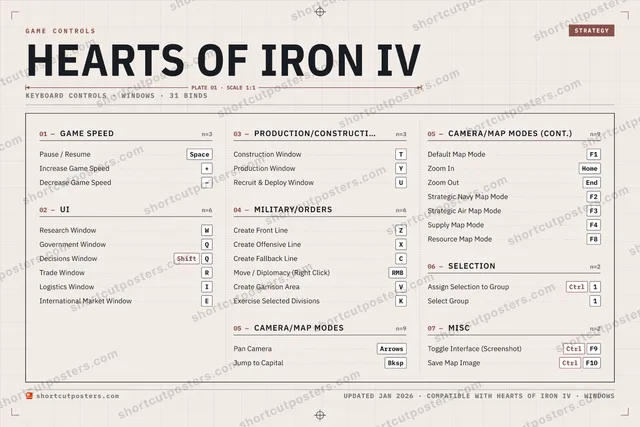
Hearts of Iron IV controls poster preview
Arcade Generative art drawn from the game's genre and colour — pure geometry, zero spoilers.
HEARTS OF IRON IVKEYBOARD SHORTCUTS · WINDOWS · 20 ESSENTIAL1CtrlAssign Sel…234567890QGovernme…WResearch…ERTConstructi…YProduction…URecruit &…IOPASDFGHJKExercise S…LZCreate Fro…XCreate Off…CCreate Fall…VCreate Gar…BNMMORE SHORTCUTSPause / ResumeSpaceIncrease Game Speed+Decrease Game Speed−Move / DiplomacyRMBPan CameraArrowsJump to CapitalBkspDefault Map ModeF1Decisions WindowShiftQSelect Group1shortcutposters.comUPDATED JAN 2026 · COMPATIBLE WITH HEARTS OF IRON IV · WINDOWS
Keyboard map Every binding labelled on a realistic QWERTY or AZERTY keyboard.
GAME SPEEDPause / ResumeSpaceIncrease Game Speed+Decrease Game Speed−MILITARY/ORDERSCreate Front LineZCreate Offensive LineXCreate Fallback LineCMove / Diplomacy (Right Click)RMBCreate Garrison AreaVExercise Selected DivisionsKSELECTIONAssign Selection to GroupCtrl1Select Group1UIResearch WindowWGovernment WindowQDecisions WindowShiftQPRODUCTION/CONSTRUCTIONConstruction WindowTProduction WindowYRecruit & Deploy WindowUCAMERA/MAP MODESPan CameraArrowsJump to CapitalBkspDefault Map ModeF1Hearts of Iron IVKEYBOARD SHORTCUTS · WINDOWS · 20 ESSENTIALBOTH LAYOUTSQWERTYQWERTYAZERTYAZERTYshortcutposters.comUPDATED JAN 2026 · COMPATIBLE WITH HEARTS OF IRON IV · WINDOWS
Isometric Shortcuts on a 3D isometric keyboard — bold and poster-like.
GAME SPEED03Pause / ResumeSpaceIncrease Game Speed+Decrease Game Speed−MILITARY/ORDERS06Create Front LineZCreate Offensive LineXCreate Fallback LineCMove / Diplomacy (Right Click)RMBCreate Garrison AreaVExercise Selected DivisionsKSELECTION02Assign Selection to GroupCtrl1Select Group1UI03Research WindowWGovernment WindowQDecisions WindowShiftQPRODUCTION/CONSTRUCTION03Construction WindowTProduction WindowYRecruit & Deploy WindowUCAMERA/MAP MODES03Pan CameraArrowsJump to CapitalBkspDefault Map ModeF1Hearts of Iron IVKEYBOARD SHORTCUTS · WINDOWS · 20 ESSENTIALBOTH LAYOUTSQWERTYQWERTYAZERTYAZERTYshortcutposters.comUPDATED JAN 2026 · COMPATIBLE WITH HEARTS OF IRON IV · WINDOWS
Typewriter A clean printed list, grouped by category — dense and legible.
HEARTS OF IRON IV · KEYBOARD SHORTCUTSWindows · 6 SETS · No.01HEARTS OF IRON IVTOTAL20SHORTCUTSFOR WINDOWS · SHIPPED COMBOSSETSGAME SPEED03UI03PRODUCTION/CO03MILITARY/ORDE06CAMERA/MAP MO03SELECTION02REF. EDITION · JAN 2026shortcutposters.comPause / ResumeSpaceIncrease Game Speed+Decrease Game Speed−Research WindowWGovernment WindowQDecisions WindowShiftQConstruction WindowTProduction WindowYRecruit & Deploy WindowUCreate Front LineZCreate Offensive LineXCreate Fallback LineCMove / Diplomacy (Right Click)RMBCreate Garrison AreaVExercise Selected DivisionsKPan CameraArrowsJump to CapitalBkspDefault Map ModeF1Assign Selection to GroupCtrl1Select Group1
Editorial A bold Swiss-style print: giant wordmark, dense keycap columns, and a totals rail.

Frequently asked questions

Is the Hearts of Iron IV controls poster maker free?

Yes — design your Hearts of Iron IV keybinds poster and download it as a free, watermarked PNG. A print-ready PDF (PC / keyboard edition) is an optional paid upgrade.

Can I choose which Hearts of Iron IV controls appear?

Yes. Toggle any keybind on or off, reorder them, rename categories, and add your own custom binds.

Which styles can I use?

Start from the Arcade style — generative art based on the game's genre — or switch to the isometric, typewriter, keyboard-map or editorial layouts, and pick your accent colour.

Does the poster use official Hearts of Iron IV artwork?

No. The poster is built only from the keybinds, text and abstract generated shapes — never logos, covers, screenshots or key art.