ShortcutPosters

Make your The Sims 3 controls poster
Pick the keybinds that matter, add your own, tune the colours and style — then download a free personalized PNG.

Making a poster for:
Style
Accent
01 —GAME MODESn=3Switch to Live ModeF1Switch to Buy ModeF2Switch to Build ModeF302 —TIMEn=5Pause the game (also 0 or `)PRegular speed1Fast speed2Ultra speed3Fast forward to the end of the interaction403 —LIVE MODEn=4Switch to the next Sim in the householdSpaceCenter on the active SimEnterOpen the skill journalJOpen the inventoryI04 —GENERALn=5UndoCtrlZToggle the cheat entry windowCtrlShiftCRedoCtrlYCancelEscHide or show the UIF1005 —HOUSE CONTROLSn=5Next floorPgUpPrevious floorPgDnNext wall modeHomePrevious wall modeEndCenter on the selected Sim's lotShiftEnter06 —CAMERAn=12Move camera forward (or Up Arrow)WMove camera back (or Down Arrow)SMove camera left (or Left Arrow)AMove camera right (or Right Arrow)DZoom in (also = or Num Pad +)ZZoom out (also - or Num Pad -)XRotate camera left,Rotate camera right.06 —CAMERA (CONT.)n=12Toggle cameraman / movie making modeTabToggle map modeMSave camera position 1Ctrl5Move to camera position 1 (5 to 9 for positions 1-5)507 —BUILD/BUY MODEn=6Rotate object,Delete object (or Backspace)DelFree-form placement (hold while moving an object)AltRotate object the other way.Free-form rotation (hold while rotating with the mouse)AltMove object to the next slot on a surfaceM08 —BUILD MODEn=3Create a room (with the wall tool)ShiftDragFill a room with wallpaper or flooringShiftLMBToggle full / quarter tile modeCtrlF09 —MOVIE MAKINGn=2Take a snapshotCStart / end video captureVGAME CONTROLSSIMULATIONTHE SIMS 3PLATE 01 · SCALE 1:1KEYBOARD CONTROLS · WINDOWS · 45 BINDSshortcutposters.comUPDATED JAN 2026 · COMPATIBLE WITH THE SIMS 3 · WINDOWSshortcutposters.comshortcutposters.comshortcutposters.comshortcutposters.comshortcutposters.comshortcutposters.comshortcutposters.comshortcutposters.comshortcutposters.comshortcutposters.comshortcutposters.comshortcutposters.comshortcutposters.comshortcutposters.comshortcutposters.comshortcutposters.comshortcutposters.comshortcutposters.comshortcutposters.comshortcutposters.comshortcutposters.comshortcutposters.comshortcutposters.comshortcutposters.comshortcutposters.comshortcutposters.comshortcutposters.comshortcutposters.comshortcutposters.comshortcutposters.comshortcutposters.comshortcutposters.comshortcutposters.comshortcutposters.comshortcutposters.comshortcutposters.comshortcutposters.comshortcutposters.comshortcutposters.comshortcutposters.comshortcutposters.comshortcutposters.comshortcutposters.comshortcutposters.comshortcutposters.comshortcutposters.comshortcutposters.comshortcutposters.comshortcutposters.comshortcutposters.comshortcutposters.comshortcutposters.comshortcutposters.comshortcutposters.comshortcutposters.comshortcutposters.comshortcutposters.comshortcutposters.comshortcutposters.comshortcutposters.comshortcutposters.comshortcutposters.comshortcutposters.comshortcutposters.comshortcutposters.comshortcutposters.comshortcutposters.comshortcutposters.comshortcutposters.comshortcutposters.comshortcutposters.comshortcutposters.comshortcutposters.comshortcutposters.comshortcutposters.comshortcutposters.comshortcutposters.comshortcutposters.comshortcutposters.comshortcutposters.comshortcutposters.comshortcutposters.comshortcutposters.comshortcutposters.comshortcutposters.comshortcutposters.comshortcutposters.comshortcutposters.comshortcutposters.comshortcutposters.comshortcutposters.comshortcutposters.comshortcutposters.comshortcutposters.comshortcutposters.comshortcutposters.comshortcutposters.comshortcutposters.comshortcutposters.comshortcutposters.comshortcutposters.comshortcutposters.comshortcutposters.comshortcutposters.comshortcutposters.comshortcutposters.comshortcutposters.comshortcutposters.comshortcutposters.comshortcutposters.comshortcutposters.com

Hover to locate · click on the poster to disable · drag to reorder categories & shortcuts · ✎ to rename a category

Free PNG $0
  • Web resolution (1600 px)
  • Light watermark
  • Instant download
Made to order
Custom print-ready PDF $2.99
  • 300 DPI, framed-quality — no watermark
  • Every standard print size
  • Built to order from the poster above — checkout link emailed to you

Trouble ordering? Email business@shortcutposters.com.

How it works

  1. 1

    Choose a style

    Start from the generative Arcade art, or switch to isometric keys, a typewriter list, a keyboard map, or an editorial print.

  2. 2

    Make it yours

    Set the accent colour and palette, rename categories, and reorder anything.

  3. 3

    Pick the controls

    Toggle exactly which keybinds appear — or add your own custom ones.

  4. 4

    Download or print

    Export a free high-resolution PNG instantly, or order a print-ready PDF.

Five styles to choose from
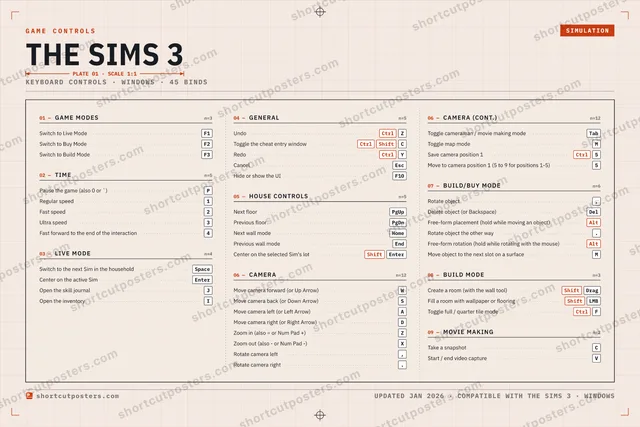
The Sims 3 controls poster preview
Arcade Generative art drawn from the game's genre and colour — pure geometry, zero spoilers.
THE SIMS 3KEYBOARD SHORTCUTS · WINDOWS · 20 ESSENTIAL1Regular sp…2Fast speed3Ultra speed4567890QWMove cam…ERTYUIOPPause the…AMove cam…SMove cam…DMove cam…FGHJKLZCtrlUndoXZoom outCCtrl ShiftToggle the…VBNMMORE SHORTCUTSSwitch to Live ModeF1Switch to Buy ModeF2Switch to Build ModeF3Switch to the next Si…SpaceCenter on the active…EnterNext floorPgUpPrevious floorPgDnZoom inZRotate object,shortcutposters.comUPDATED JAN 2026 · COMPATIBLE WITH THE SIMS 3 · WINDOWS
Keyboard map Every binding labelled on a realistic QWERTY or AZERTY keyboard.
GAME MODESSwitch to Live ModeF1Switch to Buy ModeF2Switch to Build ModeF3LIVE MODESwitch to the next Sim in the householdSpaceCenter on the active SimEnterHOUSE CONTROLSNext floorPgUpPrevious floorPgDnBUILD/BUY MODERotate object,TIMEPause the game (also 0 or `)PRegular speed1Fast speed2Ultra speed3GENERALUndoCtrlZToggle the cheat entry windowCtrlShiftCCAMERAMove camera forward (or Up Arrow)WMove camera back (or Down Arrow)SMove camera left (or Left Arrow)AMove camera right (or Right Arrow)DZoom in (also = or Num Pad +)ZZoom out (also - or Num Pad -)XThe Sims 3KEYBOARD SHORTCUTS · WINDOWS · 20 ESSENTIALBOTH LAYOUTSQWERTYQWERTYAZERTYAZERTYshortcutposters.comUPDATED JAN 2026 · COMPATIBLE WITH THE SIMS 3 · WINDOWS
Isometric Shortcuts on a 3D isometric keyboard — bold and poster-like.
GAME MODES03Switch to Live ModeF1Switch to Buy ModeF2Switch to Build ModeF3LIVE MODE02Switch to the next Sim in the ho…SpaceCenter on the active SimEnterHOUSE CONTROLS02Next floorPgUpPrevious floorPgDnBUILD/BUY MODE01Rotate object,TIME04Pause the game (also 0 or `)PRegular speed1Fast speed2Ultra speed3GENERAL02UndoCtrlZToggle the cheat entry windowCtrlShiftCCAMERA06Move camera forward (or Up Arrow)WMove camera back (or Down Arrow)SMove camera left (or Left Arrow)AMove camera rightDZoom in (also = or Num Pad +)ZZoom out (also - or Num Pad -)XThe Sims 3KEYBOARD SHORTCUTS · WINDOWS · 20 ESSENTIALBOTH LAYOUTSQWERTYQWERTYAZERTYAZERTYshortcutposters.comUPDATED JAN 2026 · COMPATIBLE WITH THE SIMS 3 · WINDOWS
Typewriter A clean printed list, grouped by category — dense and legible.
THE SIMS 3 · KEYBOARD SHORTCUTSWindows · 7 SETS · No.01THE SIMS 3TOTAL20SHORTCUTSFOR WINDOWS · SHIPPED COMBOSSETSGAME MODES03TIME04LIVE MODE02GENERAL02HOUSE CONTROL02CAMERA06BUILD/BUY MOD01REF. EDITION · JAN 2026shortcutposters.comSwitch to Live ModeF1Switch to Buy ModeF2Switch to Build ModeF3Pause the game (also 0 or `)PRegular speed1Fast speed2Ultra speed3Switch to the next Sim in the householdSpaceCenter on the active SimEnterUndoCtrlZToggle the cheat entry windowCtrlShiftCNext floorPgUpPrevious floorPgDnMove camera forward (or Up Arrow)WMove camera back (or Down Arrow)SMove camera left (or Left Arrow)AMove camera right (or Right Arrow)DZoom in (also = or Num Pad +)ZZoom out (also - or Num Pad -)XRotate object,
Editorial A bold Swiss-style print: giant wordmark, dense keycap columns, and a totals rail.

Frequently asked questions

Is the The Sims 3 controls poster maker free?

Yes — design your The Sims 3 keybinds poster and download it as a free, watermarked PNG. A print-ready PDF (PC / keyboard edition) is an optional paid upgrade.

Can I choose which The Sims 3 controls appear?

Yes. Toggle any keybind on or off, reorder them, rename categories, and add your own custom binds.

Which styles can I use?

Start from the Arcade style — generative art based on the game's genre — or switch to the isometric, typewriter, keyboard-map or editorial layouts, and pick your accent colour.

Does the poster use official The Sims 3 artwork?

No. The poster is built only from the keybinds, text and abstract generated shapes — never logos, covers, screenshots or key art.