ShortcutPosters

Make your Stronghold: Warlords controls poster
Pick the keybinds that matter, add your own, tune the colours and style — then download a free personalized PNG.

Making a poster for:
Style
Accent
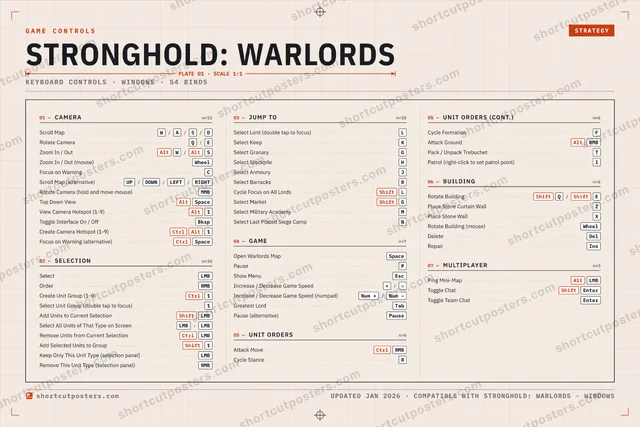
01 —CAMERAn=12Scroll MapW/A/S/DRotate CameraQ/EZoom In / OutAltW/AltSZoom In / Out (mouse)WheelFocus on WarningCScroll Map (alternative)UP/DOWN/LEFT/RIGHTRotate Camera (hold and move mouse)MMBTop Down ViewAltSpaceView Camera Hotspot (1-9)Alt1Toggle Interface On / OffBkspCreate Camera Hotspot (1-9)CtrlAlt1Focus on Warning (alternative)CtrlSpace02 —SELECTIONn=10SelectLMBOrderRMBCreate Unit Group (1-9)Ctrl1Select Unit Group (double tap to focus)1Add Units to Current SelectionShiftLMBSelect All Units of That Type on ScreenLMB›LMBRemove Units from Current SelectionCtrlLMBAdd Selected Units to GroupShift1Keep Only This Unit Type (selection panel)LMBRemove This Unit Type (selection panel)RMB03 —JUMP TOn=10Select Lord (double tap to focus)LSelect KeepKSelect GranaryGSelect StockpileHSelect ArmouryJSelect BarracksBCycle Focus on All LordsShiftLSelect MarketShiftGSelect Military AcademyMSelect Last Placed Siege CampN04 —GAMEn=7Open Warlords MapSpacePausePShow MenuEscIncrease / Decrease Game Speed+/−Increase / Decrease Game Speed (numpad)Num +/Num −Greatest LordTabPause (alternative)Pause05 —UNIT ORDERSn=6Attack MoveCtrlRMBCycle StanceR05 —UNIT ORDERS (CONT.)n=6Cycle FormationFAttack GroundAltRMBPack / Unpack TrebuchetTPatrol (right-click to set patrol point)I06 —BUILDINGn=6Rotate BuildingShiftQ/ShiftEPlace Stone Curtain WallZPlace Stone WallXRotate Building (mouse)WheelDeleteDelRepairIns07 —MULTIPLAYERn=3Ping Mini-MapAltLMBToggle ChatShiftEnterToggle Team ChatEnterGAME CONTROLSSTRATEGYSTRONGHOLD: WARLORDSPLATE 01 · SCALE 1:1KEYBOARD CONTROLS · WINDOWS · 54 BINDSshortcutposters.comUPDATED JAN 2026 · COMPATIBLE WITH STRONGHOLD: WARLORDS · WINDOWSshortcutposters.comshortcutposters.comshortcutposters.comshortcutposters.comshortcutposters.comshortcutposters.comshortcutposters.comshortcutposters.comshortcutposters.comshortcutposters.comshortcutposters.comshortcutposters.comshortcutposters.comshortcutposters.comshortcutposters.comshortcutposters.comshortcutposters.comshortcutposters.comshortcutposters.comshortcutposters.comshortcutposters.comshortcutposters.comshortcutposters.comshortcutposters.comshortcutposters.comshortcutposters.comshortcutposters.comshortcutposters.comshortcutposters.comshortcutposters.comshortcutposters.comshortcutposters.comshortcutposters.comshortcutposters.comshortcutposters.comshortcutposters.comshortcutposters.comshortcutposters.comshortcutposters.comshortcutposters.comshortcutposters.comshortcutposters.comshortcutposters.comshortcutposters.comshortcutposters.comshortcutposters.comshortcutposters.comshortcutposters.comshortcutposters.comshortcutposters.comshortcutposters.comshortcutposters.comshortcutposters.comshortcutposters.comshortcutposters.comshortcutposters.comshortcutposters.comshortcutposters.comshortcutposters.comshortcutposters.comshortcutposters.comshortcutposters.comshortcutposters.comshortcutposters.comshortcutposters.comshortcutposters.comshortcutposters.comshortcutposters.comshortcutposters.comshortcutposters.comshortcutposters.comshortcutposters.comshortcutposters.comshortcutposters.comshortcutposters.comshortcutposters.comshortcutposters.comshortcutposters.comshortcutposters.comshortcutposters.comshortcutposters.comshortcutposters.comshortcutposters.comshortcutposters.comshortcutposters.comshortcutposters.comshortcutposters.comshortcutposters.comshortcutposters.comshortcutposters.comshortcutposters.comshortcutposters.comshortcutposters.comshortcutposters.comshortcutposters.comshortcutposters.comshortcutposters.comshortcutposters.comshortcutposters.comshortcutposters.comshortcutposters.comshortcutposters.comshortcutposters.comshortcutposters.comshortcutposters.comshortcutposters.comshortcutposters.comshortcutposters.comshortcutposters.comshortcutposters.comshortcutposters.com

Hover to locate · click on the poster to disable · drag to reorder categories & shortcuts · ✎ to rename a category

Free PNG $0
  • Web resolution (1600 px)
  • Light watermark
  • Instant download
Made to order
Custom print-ready PDF $2.99
  • 300 DPI, framed-quality — no watermark
  • Every standard print size
  • Built to order from the poster above — checkout link emailed to you

Trouble ordering? Email business@shortcutposters.com.

How it works

  1. 1

    Choose a style

    Start from the generative Arcade art, or switch to isometric keys, a typewriter list, a keyboard map, or an editorial print.

  2. 2

    Make it yours

    Set the accent colour and palette, rename categories, and reorder anything.

  3. 3

    Pick the controls

    Toggle exactly which keybinds appear — or add your own custom ones.

  4. 4

    Download or print

    Export a free high-resolution PNG instantly, or order a print-ready PDF.

Five styles to choose from
Stronghold: Warlords controls poster preview
Arcade Generative art drawn from the game's genre and colour — pure geometry, zero spoilers.
STRONGHOLD: WARLORDSKEYBOARD SHORTCUTS · WINDOWS · 20 ESSENTIAL1CtrlCreate Uni…234567890QRotate Ca…WScroll MapERCycle Stan…TYUIOPPauseASDFGSelect Gra…HSelect Sto…JSelect Arm…KSelect KeepLSelect LordZXCFocus on…VBSelect Barr…NMMORE SHORTCUTSSelectLMBOrderRMBSelect Unit Group1Open Warlords MapSpaceZoom In / OutAltW/AltSZoom In / Out (mouse)WheelAdd Units to Current…ShiftLMBAttack MoveCtrlRMBshortcutposters.comUPDATED JAN 2026 · COMPATIBLE WITH STRONGHOLD: WARLORDS · WINDOWS
Keyboard map Every binding labelled on a realistic QWERTY or AZERTY keyboard.
CAMERAScroll MapW/A/S/DRotate CameraQ/EZoom In / OutAltW/AltSZoom In / Out (mouse)WheelFocus on WarningCGAMEOpen Warlords MapSpacePausePUNIT ORDERSAttack MoveCtrlRMBCycle StanceRSELECTIONSelectLMBOrderRMBCreate Unit Group (1-9)Ctrl1Select Unit Group (double tap to focus)1Add Units to Current SelectionShiftLMBJUMP TOSelect Lord (double tap to focus)LSelect KeepKSelect GranaryGSelect StockpileHSelect ArmouryJSelect BarracksBStronghold: WarlordsKEYBOARD SHORTCUTS · WINDOWS · 20 ESSENTIALBOTH LAYOUTSQWERTYQWERTYAZERTYAZERTYshortcutposters.comUPDATED JAN 2026 · COMPATIBLE WITH STRONGHOLD: WARLORDS · WINDOWS
Isometric Shortcuts on a 3D isometric keyboard — bold and poster-like.
CAMERA05Scroll MapW/A/S/DRotate CameraQ/EZoom In / OutAltW/AltSZoom In / Out (mouse)WheelFocus on WarningCGAME02Open Warlords MapSpacePausePUNIT ORDERS02Attack MoveCtrlRMBCycle StanceRSELECTION05SelectLMBOrderRMBCreate Unit Group (1-9)Ctrl1Select Unit Group1Add Units to Current SelectionShiftLMBJUMP TO06Select LordLSelect KeepKSelect GranaryGSelect StockpileHSelect ArmouryJSelect BarracksBStronghold: WarlordsKEYBOARD SHORTCUTS · WINDOWS · 20 ESSENTIALBOTH LAYOUTSQWERTYQWERTYAZERTYAZERTYshortcutposters.comUPDATED JAN 2026 · COMPATIBLE WITH STRONGHOLD: WARLORDS · WINDOWS
Typewriter A clean printed list, grouped by category — dense and legible.
STRONGHOLD: WARLORDS · KEYBOARD SHORTCUTSWindows · 5 SETS · No.01STRONGHOLD: WARLORDSTOTAL20SHORTCUTSFOR WINDOWS · SHIPPED COMBOSSETSCAMERA05SELECTION05JUMP TO06GAME02UNIT ORDERS02REF. EDITION · JAN 2026shortcutposters.comScroll MapW›A›S›DRotate CameraQ›EZoom In / OutAltW›AltSZoom In / Out (mouse)WheelFocus on WarningCSelectLMBOrderRMBCreate Unit Group (1-9)Ctrl1Select Unit Group (double tap to focus)1Add Units to Current SelectionShiftLMBSelect Lord (double tap to focus)LSelect KeepKSelect GranaryGSelect StockpileHSelect ArmouryJSelect BarracksBOpen Warlords MapSpacePausePAttack MoveCtrlRMBCycle StanceR
Editorial A bold Swiss-style print: giant wordmark, dense keycap columns, and a totals rail.

Frequently asked questions

Is the Stronghold: Warlords controls poster maker free?

Yes — design your Stronghold: Warlords keybinds poster and download it as a free, watermarked PNG. A print-ready PDF (PC / keyboard edition) is an optional paid upgrade.

Can I choose which Stronghold: Warlords controls appear?

Yes. Toggle any keybind on or off, reorder them, rename categories, and add your own custom binds.

Which styles can I use?

Start from the Arcade style — generative art based on the game's genre — or switch to the isometric, typewriter, keyboard-map or editorial layouts, and pick your accent colour.

Does the poster use official Stronghold: Warlords artwork?

No. The poster is built only from the keybinds, text and abstract generated shapes — never logos, covers, screenshots or key art.