ShortcutPosters

Make your Crusader Kings II controls poster

Pick the keybinds that matter, add your own, tune the colours and style — then download a free personalized PNG.

Making a poster for:
Style
Accent
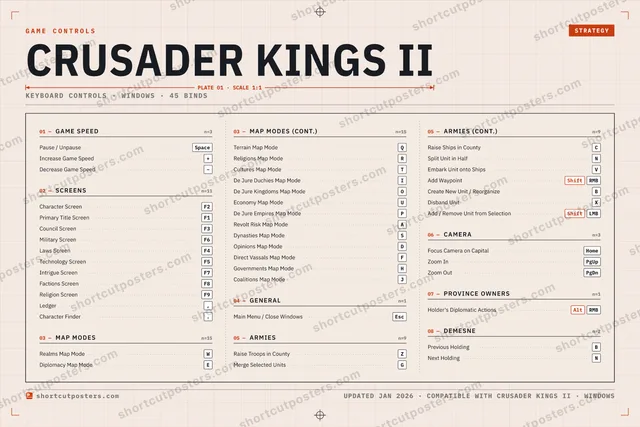
01 —GAME SPEEDn=3Pause / UnpauseSpaceIncrease Game Speed+Decrease Game Speed−02 —SCREENSn=11Character ScreenF2Primary Title ScreenF1Council ScreenF3Military ScreenF6Laws ScreenF4Technology ScreenF5Intrigue ScreenF7Factions ScreenF8Religion ScreenF9Ledger,Character Finder.03 —MAP MODESn=15Realms Map ModeWDiplomacy Map ModeE03 —MAP MODES (CONT.)n=15Terrain Map ModeQReligions Map ModeRCultures Map ModeTDe Jure Duchies Map ModeIDe Jure Kingdoms Map ModeOEconomy Map ModeUDe Jure Empires Map ModePRevolt Risk Map ModeADynasties Map ModeSOpinions Map ModeDDirect Vassals Map ModeFGovernments Map ModeHCoalitions Map ModeJ04 —GENERALn=1Main Menu / Close WindowsEsc05 —ARMIESn=9Raise Troops in CountyZMerge Selected UnitsG05 —ARMIES (CONT.)n=9Raise Ships in CountyCSplit Unit in HalfNEmbark Unit onto ShipsVAdd WaypointShiftRMBCreate New Unit / ReorganizeBDisband UnitXAdd / Remove Unit from SelectionShiftLMB06 —CAMERAn=3Focus Camera on CapitalHomeZoom InPgUpZoom OutPgDn07 —PROVINCE OWNERSn=1Holder's Diplomatic ActionsAltRMB08 —DEMESNEn=2Previous HoldingBNext HoldingNGAME CONTROLSSTRATEGYCRUSADER KINGS IIPLATE 01 · SCALE 1:1KEYBOARD CONTROLS · WINDOWS · 45 BINDSshortcutposters.comUPDATED JAN 2026 · COMPATIBLE WITH CRUSADER KINGS II · WINDOWSshortcutposters.comshortcutposters.comshortcutposters.comshortcutposters.comshortcutposters.comshortcutposters.comshortcutposters.comshortcutposters.comshortcutposters.comshortcutposters.comshortcutposters.comshortcutposters.comshortcutposters.comshortcutposters.comshortcutposters.comshortcutposters.comshortcutposters.comshortcutposters.comshortcutposters.comshortcutposters.comshortcutposters.comshortcutposters.comshortcutposters.comshortcutposters.comshortcutposters.comshortcutposters.comshortcutposters.comshortcutposters.comshortcutposters.comshortcutposters.comshortcutposters.comshortcutposters.comshortcutposters.comshortcutposters.comshortcutposters.comshortcutposters.comshortcutposters.comshortcutposters.comshortcutposters.comshortcutposters.comshortcutposters.comshortcutposters.comshortcutposters.comshortcutposters.comshortcutposters.comshortcutposters.comshortcutposters.comshortcutposters.comshortcutposters.comshortcutposters.comshortcutposters.comshortcutposters.comshortcutposters.comshortcutposters.comshortcutposters.comshortcutposters.comshortcutposters.comshortcutposters.comshortcutposters.comshortcutposters.comshortcutposters.comshortcutposters.comshortcutposters.comshortcutposters.comshortcutposters.comshortcutposters.comshortcutposters.comshortcutposters.comshortcutposters.comshortcutposters.comshortcutposters.comshortcutposters.comshortcutposters.comshortcutposters.comshortcutposters.comshortcutposters.comshortcutposters.comshortcutposters.comshortcutposters.comshortcutposters.comshortcutposters.comshortcutposters.comshortcutposters.comshortcutposters.comshortcutposters.comshortcutposters.comshortcutposters.comshortcutposters.comshortcutposters.comshortcutposters.comshortcutposters.comshortcutposters.comshortcutposters.comshortcutposters.comshortcutposters.comshortcutposters.comshortcutposters.comshortcutposters.comshortcutposters.comshortcutposters.comshortcutposters.comshortcutposters.comshortcutposters.comshortcutposters.comshortcutposters.comshortcutposters.comshortcutposters.comshortcutposters.comshortcutposters.comshortcutposters.comshortcutposters.com

Hover to locate · click on the poster to disable · drag to reorder categories & shortcuts · ✎ to rename a category

Free PNG $0
  • Web resolution (1600 px)
  • Light watermark
  • Instant download
Made to order
Custom print-ready PDF $2.99
  • 300 DPI, framed-quality — no watermark
  • Every standard print size
  • Built to order from the poster above — checkout link emailed to you

Trouble ordering? Email business@shortcutposters.com.

How it works

  1. 1

    Choose a style

    Start from the generative Arcade art, or switch to isometric keys, a typewriter list, a keyboard map, or an editorial print.

  2. 2

    Make it yours

    Set the accent colour and palette, rename categories, and reorder anything.

  3. 3

    Pick the controls

    Toggle exactly which keybinds appear — or add your own custom ones.

  4. 4

    Download or print

    Export a free high-resolution PNG instantly, or order a print-ready PDF.

Five styles to choose from
Crusader Kings II controls poster preview
Arcade Generative art drawn from the game's genre and colour — pure geometry, zero spoilers.
CRUSADER KINGS IIKEYBOARD SHORTCUTS · WINDOWS · 20 ESSENTIAL1234567890QWRealms Ma…EDiplomacy…RTYUIOPASDFGMerge Sel…HJKLZRaise Troo…XCVBNMMORE SHORTCUTSPause / UnpauseSpaceIncrease Game Speed+Decrease Game Speed−Character ScreenF2Primary Title ScreenF1Council ScreenF3Military ScreenF6Main Menu / Close Wi…EscLaws ScreenF4Technology ScreenF5Intrigue ScreenF7Factions ScreenF8Religion ScreenF9Focus Camera on Ca…HomeLedger,Character Finder.shortcutposters.comUPDATED JAN 2026 · COMPATIBLE WITH CRUSADER KINGS II · WINDOWS
Keyboard map Every binding labelled on a realistic QWERTY or AZERTY keyboard.
GAME SPEEDPause / UnpauseSpaceIncrease Game Speed+Decrease Game Speed−MAP MODESRealms Map ModeWDiplomacy Map ModeEGENERALMain Menu / Close WindowsEscCAMERAFocus Camera on CapitalHomeSCREENSCharacter ScreenF2Primary Title ScreenF1Council ScreenF3Military ScreenF6Laws ScreenF4Technology ScreenF5Intrigue ScreenF7Factions ScreenF8Religion ScreenF9Ledger,Character Finder.ARMIESRaise Troops in CountyZMerge Selected UnitsGCrusader Kings IIKEYBOARD SHORTCUTS · WINDOWS · 20 ESSENTIALBOTH LAYOUTSQWERTYQWERTYAZERTYAZERTYshortcutposters.comUPDATED JAN 2026 · COMPATIBLE WITH CRUSADER KINGS II · WINDOWS
Isometric Shortcuts on a 3D isometric keyboard — bold and poster-like.
GAME SPEED03Pause / UnpauseSpaceIncrease Game Speed+Decrease Game Speed−MAP MODES02Realms Map ModeWDiplomacy Map ModeEGENERAL01Main Menu / Close WindowsEscCAMERA01Focus Camera on CapitalHomeSCREENS11Character ScreenF2Primary Title ScreenF1Council ScreenF3Military ScreenF6Laws ScreenF4Technology ScreenF5Intrigue ScreenF7Factions ScreenF8Religion ScreenF9Ledger,Character Finder.ARMIES02Raise Troops in CountyZMerge Selected UnitsGCrusader Kings IIKEYBOARD SHORTCUTS · WINDOWS · 20 ESSENTIALBOTH LAYOUTSQWERTYQWERTYAZERTYAZERTYshortcutposters.comUPDATED JAN 2026 · COMPATIBLE WITH CRUSADER KINGS II · WINDOWS
Typewriter A clean printed list, grouped by category — dense and legible.
CRUSADER KINGS II · KEYBOARD SHORTCUTSWindows · 6 SETS · No.01CRUSADER KINGS IITOTAL20SHORTCUTSFOR WINDOWS · SHIPPED COMBOSSETSGAME SPEED03SCREENS11MAP MODES02GENERAL01ARMIES02CAMERA01REF. EDITION · JAN 2026shortcutposters.comPause / UnpauseSpaceIncrease Game Speed+Decrease Game Speed−Character ScreenF2Primary Title ScreenF1Council ScreenF3Military ScreenF6Laws ScreenF4Technology ScreenF5Intrigue ScreenF7Factions ScreenF8Religion ScreenF9Ledger,Character Finder.Realms Map ModeWDiplomacy Map ModeEMain Menu / Close WindowsEscRaise Troops in CountyZMerge Selected UnitsGFocus Camera on CapitalHome
Editorial A bold Swiss-style print: giant wordmark, dense keycap columns, and a totals rail.

Frequently asked questions

Is the Crusader Kings II controls poster maker free?

Yes — design your Crusader Kings II keybinds poster and download it as a free, watermarked PNG. A print-ready PDF (PC / keyboard edition) is an optional paid upgrade.

Can I choose which Crusader Kings II controls appear?

Yes. Toggle any keybind on or off, reorder them, rename categories, and add your own custom binds.

Which styles can I use?

Start from the Arcade style — generative art based on the game's genre — or switch to the isometric, typewriter, keyboard-map or editorial layouts, and pick your accent colour.

Does the poster use official Crusader Kings II artwork?

No. The poster is built only from the keybinds, text and abstract generated shapes — never logos, covers, screenshots or key art.