ShortcutPosters

Make your Command & Conquer Remastered Collection controls poster
Pick the keybinds that matter, add your own, tune the colours and style — then download a free personalized PNG.

Making a poster for:
Style
Accent
01 —SELECTIONn=7Select Control Group 1 (0–9)1Assign Control Group 1 (0–9)Ctrl1Select All Units in ViewASelect All Units Across the MapShiftAAdd Control Group 1 (0–9) to SelectionShift1Select Next Unit or Structure.Select Previous Unit or Structure,02 —SIDEBARn=10Structures TabWInfantry TabEVehicles TabRToggle Repair ModeShiftRToggle Sell ModeShiftSSuperweapons TabTAdd or Remove 5 Units in the Production QueueShiftToggle Sidebar VisibilityCtrlSSidebar Scroll UpCtrlPgUpSidebar Scroll DownCtrlPgDn03 —ORDERSn=9Force Fire (hold and click)CtrlLMBGuard ModeGStop MovingSForce Move (hold and click)AltLMBScatter UnitsXDeploy Selected MCV\Queued Unit Movement (Red Alert only)QGuard a Spot on the MapCtrlAltLMBTeam Movement at Slowest Unit's SpeedAltF04 —CAMERAn=8Camera to Construction YardHScroll CameraUP/DOWN/LEFT/RIGHTZoom Camera InPgUpZoom Camera OutPgDnCamera to SelectedHomeCamera to Next PingTabSet Map Bookmark 1 (1–4)CtrlF1Go to Map Bookmark 1 (1–4)F105 —GENERALn=4Toggle Classic GraphicsSpaceQuick SaveCtrlNJukebox: Next Track=Jukebox: Previous Track−06 —SUPERWEAPONSn=3GDI: Activate Ion CannonIGDI: Activate A-10 AirstrikeDNod: Activate NukeN07 —MULTIPLAYERn=5Team ChatEnterAll ChatShiftEnterSend All Chat: "Good Luck, Have Fun!"CtrlF5Send Team Chat: "Help me!"F5Send Team Chat: "Attack!"F6GAME CONTROLSSTRATEGYCOMMAND & CONQUER REMASTERED COLLECTIONPLATE 01 · SCALE 1:1KEYBOARD CONTROLS · WINDOWS · 46 BINDSshortcutposters.comUPDATED JAN 2026 · COMPATIBLE WITH COMMAND & CONQUER REMASTERED COLLECTION · WINDOWSshortcutposters.comshortcutposters.comshortcutposters.comshortcutposters.comshortcutposters.comshortcutposters.comshortcutposters.comshortcutposters.comshortcutposters.comshortcutposters.comshortcutposters.comshortcutposters.comshortcutposters.comshortcutposters.comshortcutposters.comshortcutposters.comshortcutposters.comshortcutposters.comshortcutposters.comshortcutposters.comshortcutposters.comshortcutposters.comshortcutposters.comshortcutposters.comshortcutposters.comshortcutposters.comshortcutposters.comshortcutposters.comshortcutposters.comshortcutposters.comshortcutposters.comshortcutposters.comshortcutposters.comshortcutposters.comshortcutposters.comshortcutposters.comshortcutposters.comshortcutposters.comshortcutposters.comshortcutposters.comshortcutposters.comshortcutposters.comshortcutposters.comshortcutposters.comshortcutposters.comshortcutposters.comshortcutposters.comshortcutposters.comshortcutposters.comshortcutposters.comshortcutposters.comshortcutposters.comshortcutposters.comshortcutposters.comshortcutposters.comshortcutposters.comshortcutposters.comshortcutposters.comshortcutposters.comshortcutposters.comshortcutposters.comshortcutposters.comshortcutposters.comshortcutposters.comshortcutposters.comshortcutposters.comshortcutposters.comshortcutposters.comshortcutposters.comshortcutposters.comshortcutposters.comshortcutposters.comshortcutposters.comshortcutposters.comshortcutposters.comshortcutposters.comshortcutposters.comshortcutposters.comshortcutposters.comshortcutposters.comshortcutposters.comshortcutposters.comshortcutposters.comshortcutposters.comshortcutposters.comshortcutposters.comshortcutposters.comshortcutposters.comshortcutposters.comshortcutposters.comshortcutposters.comshortcutposters.comshortcutposters.comshortcutposters.comshortcutposters.comshortcutposters.comshortcutposters.comshortcutposters.comshortcutposters.comshortcutposters.comshortcutposters.comshortcutposters.comshortcutposters.comshortcutposters.comshortcutposters.comshortcutposters.comshortcutposters.comshortcutposters.comshortcutposters.comshortcutposters.comshortcutposters.com

Hover to locate · click on the poster to disable · drag to reorder categories & shortcuts · ✎ to rename a category

Free PNG $0
  • Web resolution (1600 px)
  • Light watermark
  • Instant download
Made to order
Custom print-ready PDF $2.99
  • 300 DPI, framed-quality — no watermark
  • Every standard print size
  • Built to order from the poster above — checkout link emailed to you

Trouble ordering? Email business@shortcutposters.com.

How it works

  1. 1

    Choose a style

    Start from the generative Arcade art, or switch to isometric keys, a typewriter list, a keyboard map, or an editorial print.

  2. 2

    Make it yours

    Set the accent colour and palette, rename categories, and reorder anything.

  3. 3

    Pick the controls

    Toggle exactly which keybinds appear — or add your own custom ones.

  4. 4

    Download or print

    Export a free high-resolution PNG instantly, or order a print-ready PDF.

Five styles to choose from
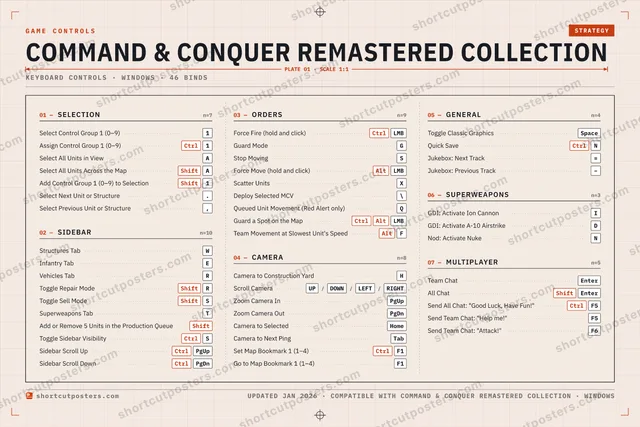
Command & Conquer Remastered Collection controls poster preview
Arcade Generative art drawn from the game's genre and colour — pure geometry, zero spoilers.
COMMAND & CONQUER REMASTERED COLLECTIONKEYBOARD SHORTCUTS · WINDOWS · 20 ESSENTIAL1Select Con…234567890QWStructures…EInfantry TabRVehicles T…TSuperwea…YUIOPASelect All…SShiftToggle Sell…DFGGuard Mo…HCamera to…JKLZXScatter Uni…CVBNMMORE SHORTCUTSAssign Control Group 1Ctrl1Toggle Repair ModeShiftRSelect All Units Acros…ShiftAForce FireCtrlLMBStop MovingSToggle Classic Graphi…SpaceAdd or Remove 5 Uni…ShiftAdd Control Group 1 (…Shift1Force MoveAltLMBDeploy Selected MCV\shortcutposters.comUPDATED JAN 2026 · COMPATIBLE WITH COMMAND & CONQUER REMASTERED COLLECTION · WINDOWS
Keyboard map Every binding labelled on a realistic QWERTY or AZERTY keyboard.
SIDEBARStructures TabWInfantry TabEVehicles TabRToggle Repair ModeShiftRToggle Sell ModeShiftSSuperweapons TabTAdd or Remove 5 Units in the Production…ShiftCAMERACamera to Construction YardHGENERALToggle Classic GraphicsSpaceSELECTIONSelect Control Group 1 (0–9)1Assign Control Group 1 (0–9)Ctrl1Select All Units in ViewASelect All Units Across the MapShiftAAdd Control Group 1 (0–9) to SelectionShift1ORDERSForce Fire (hold and click)CtrlLMBGuard ModeGStop MovingSForce Move (hold and click)AltLMBScatter UnitsXDeploy Selected MCV\Command & Conquer Remastered CollectionKEYBOARD SHORTCUTS · WINDOWS · 20 ESSENTIALBOTH LAYOUTSQWERTYQWERTYAZERTYAZERTYshortcutposters.comUPDATED JAN 2026 · COMPATIBLE WITH COMMAND & CONQUER REMASTERED COLLECTION · WINDOWS
Isometric Shortcuts on a 3D isometric keyboard — bold and poster-like.
SIDEBAR07Structures TabWInfantry TabEVehicles TabRToggle Repair ModeShiftRToggle Sell ModeShiftSSuperweapons TabTAdd or Remove 5 Units in the…ShiftCAMERA01Camera to Construction YardHGENERAL01Toggle Classic GraphicsSpaceSELECTION05Select Control Group 1 (0–9)1Assign Control Group 1 (0–9)Ctrl1Select All Units in ViewASelect All Units Across the M…ShiftAAdd Control Group 1 (0–9) to…Shift1ORDERS06Force Fire (hold and click)CtrlLMBGuard ModeGStop MovingSForce Move (hold and click)AltLMBScatter UnitsXDeploy Selected MCV\Command & Conquer Remastered CollectionKEYBOARD SHORTCUTS · WINDOWS · 20 ESSENTIALBOTH LAYOUTSQWERTYQWERTYAZERTYAZERTYshortcutposters.comUPDATED JAN 2026 · COMPATIBLE WITH COMMAND & CONQUER REMASTERED COLLECTION · WINDOWS
Typewriter A clean printed list, grouped by category — dense and legible.
COMMAND & CONQUER REMASTERED COLLECTION · KEYBOARD SHORTCUTSWindows · 5 SETS · No.01COMMAND & CONQUER REMASTERED COLLECTIONTOTAL20SHORTCUTSFOR WINDOWS · SHIPPED COMBOSSETSSELECTION05SIDEBAR07ORDERS06CAMERA01GENERAL01REF. EDITION · JAN 2026shortcutposters.comSelect Control Group 1 (0–9)1Assign Control Group 1 (0–9)Ctrl1Select All Units in ViewASelect All Units Across the MapShiftAAdd Control Group 1 (0–9) to SelectionShift1Structures TabWInfantry TabEVehicles TabRToggle Repair ModeShiftRToggle Sell ModeShiftSSuperweapons TabTAdd or Remove 5 Units in the Production Queue (hold)ShiftForce Fire (hold and click)CtrlLMBGuard ModeGStop MovingSForce Move (hold and click)AltLMBScatter UnitsXDeploy Selected MCV\Camera to Construction YardHToggle Classic GraphicsSpace
Editorial A bold Swiss-style print: giant wordmark, dense keycap columns, and a totals rail.

Frequently asked questions

Is the Command & Conquer Remastered Collection controls poster maker free?

Yes — design your Command & Conquer Remastered Collection keybinds poster and download it as a free, watermarked PNG. A print-ready PDF (PC / keyboard edition) is an optional paid upgrade.

Can I choose which Command & Conquer Remastered Collection controls appear?

Yes. Toggle any keybind on or off, reorder them, rename categories, and add your own custom binds.

Which styles can I use?

Start from the Arcade style — generative art based on the game's genre — or switch to the isometric, typewriter, keyboard-map or editorial layouts, and pick your accent colour.

Does the poster use official Command & Conquer Remastered Collection artwork?

No. The poster is built only from the keybinds, text and abstract generated shapes — never logos, covers, screenshots or key art.