Spore Keyboard controls
- Windows · Mac
- 44 default keybinds
- Simulation →
Cover art © its publisher — for identification only. Cover © its publisher. Details
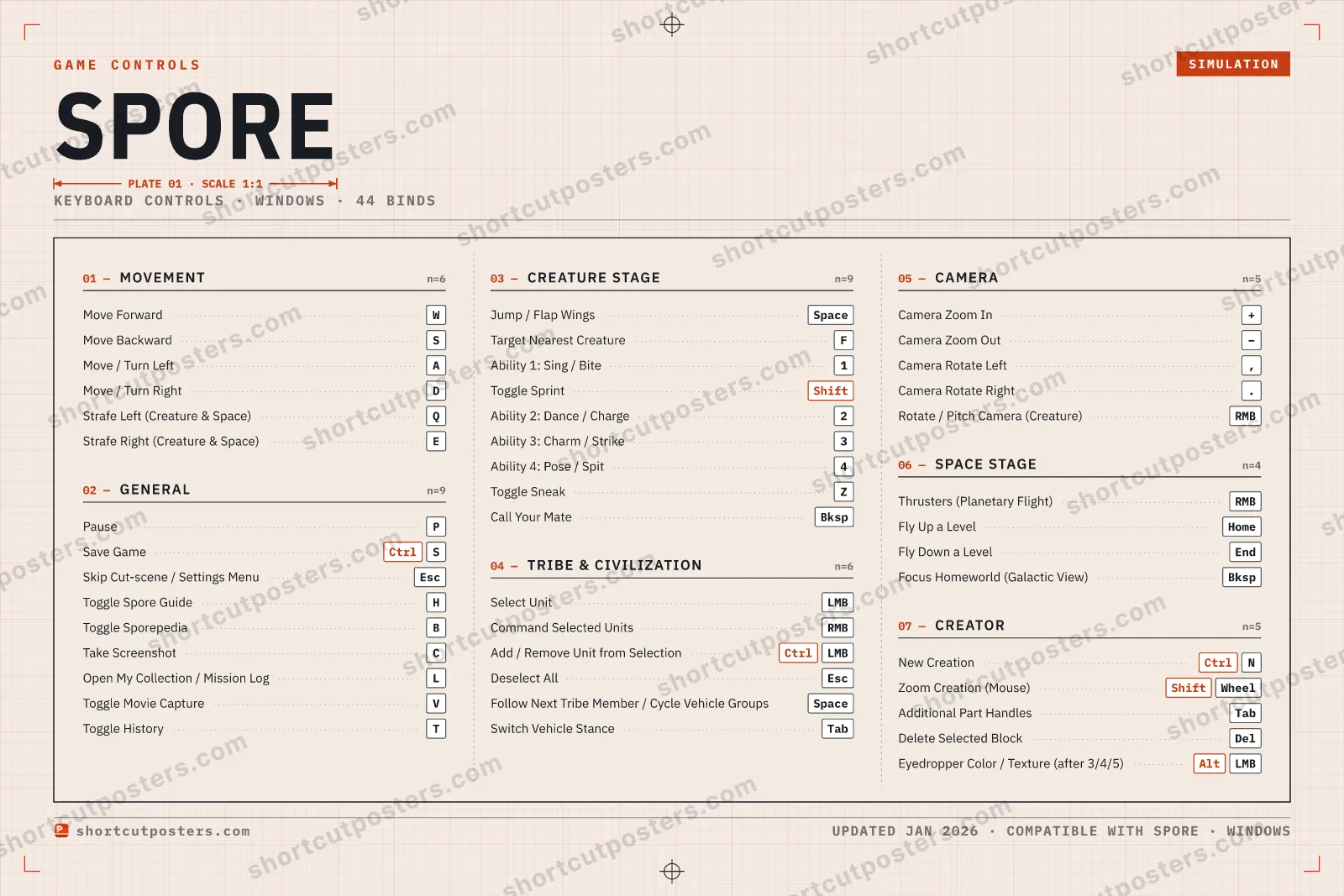
Spore is Maxis's 2008 evolution sandbox that takes a species from a single cell through Creature, Tribe, Civilization and Space stages. These default PC controls come from the game's own manual and cover the shared hotkeys, each stage's movement and abilities, and the Spore Creator.
All Spore keyboard controls
44 shortcuts
General 9
| Action | Shortcut |
|---|---|
| Pause | P |
| Save Game | CtrlS |
| Skip Cut-scene / Settings Menu | Esc |
| Toggle Spore Guide | H |
| Toggle Sporepedia | B |
| Take Screenshot | C |
| Open My Collection / Mission Log | L |
| Toggle Movie Capture | V |
| Toggle History | T |
Creature Stage 9
| Action | Shortcut |
|---|---|
| Jump / Flap Wings | Space |
| Target Nearest Creature | F |
| Ability 1: Sing / Bite | 1 |
| Toggle Sprint | Shift |
| Ability 2: Dance / Charge | 2 |
| Ability 3: Charm / Strike | 3 |
| Ability 4: Pose / Spit | 4 |
| Toggle Sneak | Z |
| Call Your Mate | Bksp |
Movement 6
| Action | Shortcut |
|---|---|
| Move Forward | W |
| Move Backward | S |
| Move / Turn Left | A |
| Move / Turn Right | D |
| Strafe Left (Creature & Space) | Q |
| Strafe Right (Creature & Space) | E |
Tribe & Civilization 6
| Action | Shortcut |
|---|---|
| Select Unit | LMB |
| Command Selected Units | RMB |
| Add / Remove Unit from Selection | CtrlLMB |
| Deselect All | Esc |
| Follow Next Tribe Member / Cycle Vehicle Groups | Space |
| Switch Vehicle Stance | Tab |
Camera 5
| Action | Shortcut |
|---|---|
| Camera Zoom In | + |
| Camera Zoom Out | − |
| Camera Rotate Left | , |
| Camera Rotate Right | . |
| Rotate / Pitch Camera (Creature) | RMB |
Creator 5
| Action | Shortcut |
|---|---|
| New Creation | CtrlN |
| Zoom Creation (Mouse) | ShiftWheel |
| Additional Part Handles | Tab |
| Delete Selected Block | Del |
| Eyedropper Color / Texture (after 3/4/5) | AltLMB |
Space Stage 4
| Action | Shortcut |
|---|---|
| Thrusters (Planetary Flight) | RMB |
| Fly Up a Level | Home |
| Fly Down a Level | End |
| Focus Homeworld (Galactic View) | Bksp |
Sourced from store.steampowered.com Last verified
+ 4 more controls in the table below
+ 4 more controls in the table below
44 default keybinds across 7 categories. Most can be reassigned in Spore's control settings.
Unofficial reference. ShortcutPosters is not affiliated with, endorsed by, or sponsored by Spore. All product names, logos, and trademarks are property of their respective owners. See our licensing & trademark notice.
Spore, framed.
Every bind, razor-sharp.
Print-ready 36×24″ at 300 DPI. No watermark. Hang it, gift it, or turn it into a desk mat.
- Free preview
- 1600 px · watermarked
- Print-ready
- 10 800 px · frame quality
- Frame it36×24″, A1 or A2
- Desk matany print shop
- Gift itfor your duo or squad
Spore controls — FAQ
- What are the default controls for Spore?
- Spore, a simulation game, uses 44 default keybinds across 7 categories. The complete, up-to-date list is free to read on this page.
- Can you remap Spore controls?
- Yes. These are the game's default bindings — nearly all of them can be reassigned from Spore's in-game control or key-binding settings.
- Which platforms do these Spore controls cover?
- These keyboard controls apply on Windows and Mac. Most bindings are identical across platforms unless noted.
- Is this an official Spore resource?
- No. This is an unofficial reference and is not affiliated with or endorsed by Spore or its publisher. All trademarks belong to their respective owners.
Thanks — your feedback helps us improve.