Sid Meier's Civilization IV: Colonization Keyboard controls
- Windows · Mac
- 32 default keybinds
- Strategy →
- Civilization collection →
Cover art © its publisher — for identification only. Cover © its publisher. Details
Sid Meier's Civilization IV: Colonization is Firaxis' 2008 remake of the 1994 classic, rebuilt on the Civilization IV engine: you found colonies in the New World, trade with the Crown and ultimately declare independence. This reference collects the default PC hotkeys from the official manual, from quick-saving and camera control to the F-key advisor screens, the Europe screen and the Continental Congress.
All Sid Meier's Civilization IV: Colonization keyboard controls
32 shortcuts
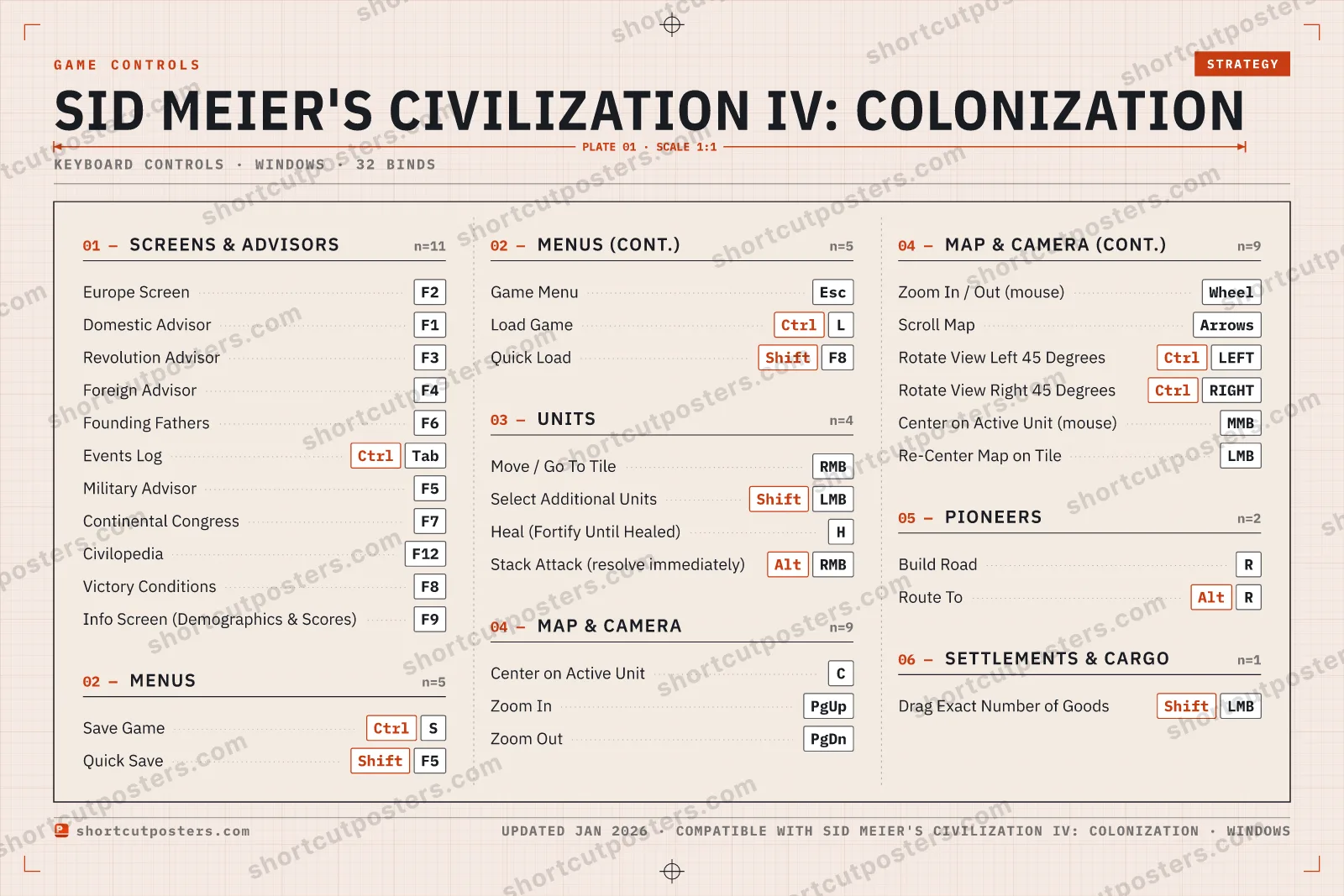
Screens & Advisors 11
| Action | Shortcut |
|---|---|
| Europe Screen | F2 |
| Domestic Advisor | F1 |
| Revolution Advisor | F3 |
| Foreign Advisor | F4 |
| Founding Fathers | F6 |
| Events Log | CtrlTab |
| Military Advisor | F5 |
| Continental Congress | F7 |
| Civilopedia | F12 |
| Victory Conditions | F8 |
| Info Screen (Demographics & Scores) | F9 |
Map & Camera 9
| Action | Shortcut |
|---|---|
| Center on Active Unit | C |
| Zoom In | PgUp |
| Zoom Out | PgDn |
| Zoom In / Out (mouse) | Wheel |
| Scroll Map | Arrows |
| Rotate View Left 45 Degrees | CtrlLEFT |
| Rotate View Right 45 Degrees | CtrlRIGHT |
| Center on Active Unit (mouse) | MMB |
| Re-Center Map on Tile | LMB |
Menus 5
| Action | Shortcut |
|---|---|
| Save Game | CtrlS |
| Quick Save | ShiftF5 |
| Game Menu | Esc |
| Load Game | CtrlL |
| Quick Load | ShiftF8 |
Units 4
| Action | Shortcut |
|---|---|
| Move / Go To Tile | RMB |
| Select Additional Units | ShiftLMB |
| Heal (Fortify Until Healed) | H |
| Stack Attack (resolve immediately) | AltRMB |
Pioneers 2
| Action | Shortcut |
|---|---|
| Build Road | R |
| Route To | AltR |
Settlements & Cargo 1
| Action | Shortcut |
|---|---|
| Drag Exact Number of Goods | ShiftLMB |
Sourced from store.steampowered.com, shared.fastly.steamstatic.com Last verified
+ 3 more controls in the table below
+ 3 more controls in the table below
32 default keybinds across 6 categories. Most can be reassigned in Sid Meier's Civilization IV: Colonization's control settings.
Unofficial reference. ShortcutPosters is not affiliated with, endorsed by, or sponsored by Sid Meier's Civilization IV: Colonization. All product names, logos, and trademarks are property of their respective owners. See our licensing & trademark notice.
Sid Meier's Civilization IV: Colonization, framed.
Every bind, razor-sharp.
Print-ready 36×24″ at 300 DPI. No watermark. Hang it, gift it, or turn it into a desk mat.
- Free preview
- 1600 px · watermarked
- Print-ready
- 10 800 px · frame quality
- Frame it36×24″, A1 or A2
- Desk matany print shop
- Gift itfor your duo or squad
Sid Meier's Civilization IV: Colonization controls — FAQ
- What are the default controls for Sid Meier's Civilization IV: Colonization?
- Sid Meier's Civilization IV: Colonization, a strategy game, uses 32 default keybinds across 6 categories. The complete, up-to-date list is free to read on this page.
- Can you remap Sid Meier's Civilization IV: Colonization controls?
- Yes. These are the game's default bindings — nearly all of them can be reassigned from Sid Meier's Civilization IV: Colonization's in-game control or key-binding settings.
- Which platforms do these Sid Meier's Civilization IV: Colonization controls cover?
- These keyboard controls apply on Windows and Mac. Most bindings are identical across platforms unless noted.
- Is this an official Sid Meier's Civilization IV: Colonization resource?
- No. This is an unofficial reference and is not affiliated with or endorsed by Sid Meier's Civilization IV: Colonization or its publisher. All trademarks belong to their respective owners.
Thanks — your feedback helps us improve.
Civilization collection
6 Civilization games in the catalogue, every control scheme free to read.
See all 6 Civilization games →