Bus Simulator 27 Keyboard controls
- Windows
- 47 default keybinds
- Simulation →
Cover art © its publisher — for identification only. Cover © its publisher. Details
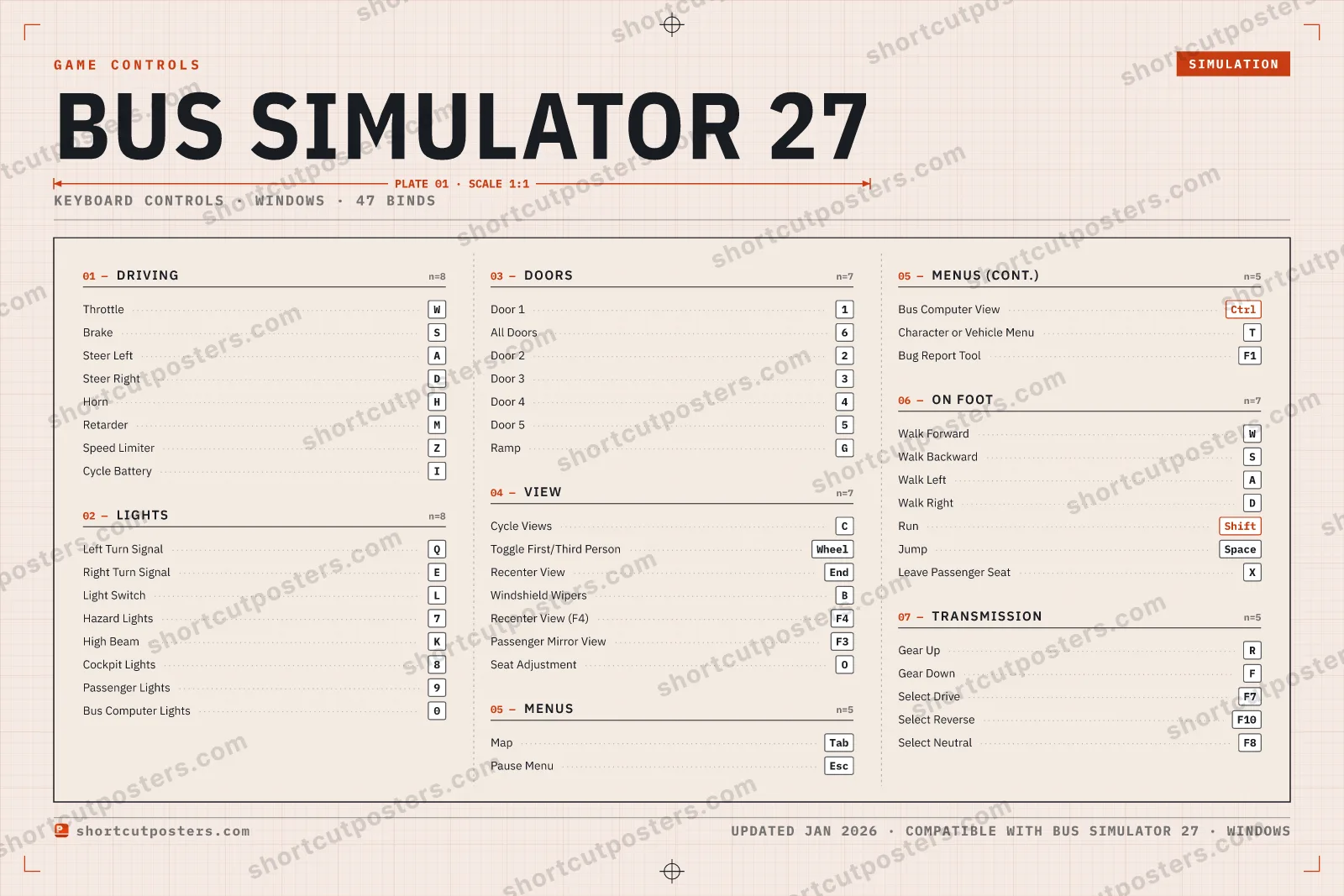
Bus Simulator 27 puts a whole transit company on the keyboard: throttle and steering on WASD, indicators on Q and E, doors on the number row, and a separate on-foot scheme for walking the depot. The transmission, lights and passenger doors each have their own cluster, which is what makes a route run smoothly rather than stopping to hunt for a key.
All Bus Simulator 27 keyboard controls
47 shortcuts
Driving 8
| Action | Shortcut |
|---|---|
| Throttle | W |
| Brake | S |
| Steer Left | A |
| Steer Right | D |
| Horn | H |
| Retarder | M |
| Speed Limiter | Z |
| Cycle Battery | I |
Lights 8
| Action | Shortcut |
|---|---|
| Left Turn Signal | Q |
| Right Turn Signal | E |
| Light Switch | L |
| Hazard Lights | 7 |
| High Beam | K |
| Cockpit Lights | 8 |
| Passenger Lights | 9 |
| Bus Computer Lights | 0 |
On Foot 7
| Action | Shortcut |
|---|---|
| Walk Forward | W |
| Walk Backward | S |
| Walk Left | A |
| Walk Right | D |
| Run | Shift |
| Jump | Space |
| Leave Passenger Seat | X |
Doors 7
| Action | Shortcut |
|---|---|
| Door 1 | 1 |
| All Doors | 6 |
| Door 2 | 2 |
| Door 3 | 3 |
| Door 4 | 4 |
| Door 5 | 5 |
| Ramp | G |
View 7
| Action | Shortcut |
|---|---|
| Cycle Views | C |
| Toggle First/Third Person | Wheel |
| Recenter View | End |
| Windshield Wipers | B |
| Recenter View (F4) | F4 |
| Passenger Mirror View | F3 |
| Seat Adjustment | O |
Transmission 5
| Action | Shortcut |
|---|---|
| Gear Up | R |
| Gear Down | F |
| Select Drive | F7 |
| Select Reverse | F10 |
| Select Neutral | F8 |
Menus 5
| Action | Shortcut |
|---|---|
| Map | Tab |
| Pause Menu | Esc |
| Bus Computer View | Ctrl |
| Character or Vehicle Menu | T |
| Bug Report Tool | F1 |
Sourced from bussimulator.com, magicgameworld.com, bussimulator27.wiki Last verified
+ 1 more control in the table below
+ 1 more control in the table below
47 default keybinds across 7 categories. Most can be reassigned in Bus Simulator 27's control settings.
Unofficial reference. ShortcutPosters is not affiliated with, endorsed by, or sponsored by Bus Simulator 27. All product names, logos, and trademarks are property of their respective owners. See our licensing & trademark notice.
Bus Simulator 27, framed.
Every bind, razor-sharp.
Print-ready 36×24″ at 300 DPI. No watermark. Hang it, gift it, or turn it into a desk mat.
- Free preview
- 1600 px · watermarked
- Print-ready
- 10 800 px · frame quality
- Frame it36×24″, A1 or A2
- Desk matany print shop
- Gift itfor your duo or squad
These shortcuts, on physical keys
There is a Stream Deck profile for Bus Simulator 27 — 35 shortcuts laid out across the keys, each one labelled, installed by double-clicking a file. It fits every current Stream Deck model.
Bus Simulator 27 controls — FAQ
- What are the default controls for Bus Simulator 27?
- Bus Simulator 27, a simulation game, uses 47 default keybinds across 7 categories. The complete, up-to-date list is free to read on this page.
- Can you remap Bus Simulator 27 controls?
- Yes. These are the game's default bindings — nearly all of them can be reassigned from Bus Simulator 27's in-game control or key-binding settings.
- Which platforms do these Bus Simulator 27 controls cover?
- These keyboard controls apply on Windows. Most bindings are identical across platforms unless noted.
- Is this an official Bus Simulator 27 resource?
- No. This is an unofficial reference and is not affiliated with or endorsed by Bus Simulator 27 or its publisher. All trademarks belong to their respective owners.
Thanks — your feedback helps us improve.