ShortcutPosters

Just Cause 4 Keyboard & controller controls

Get the poster

Cover art © its publisher — for identification only. Cover © its publisher. Details

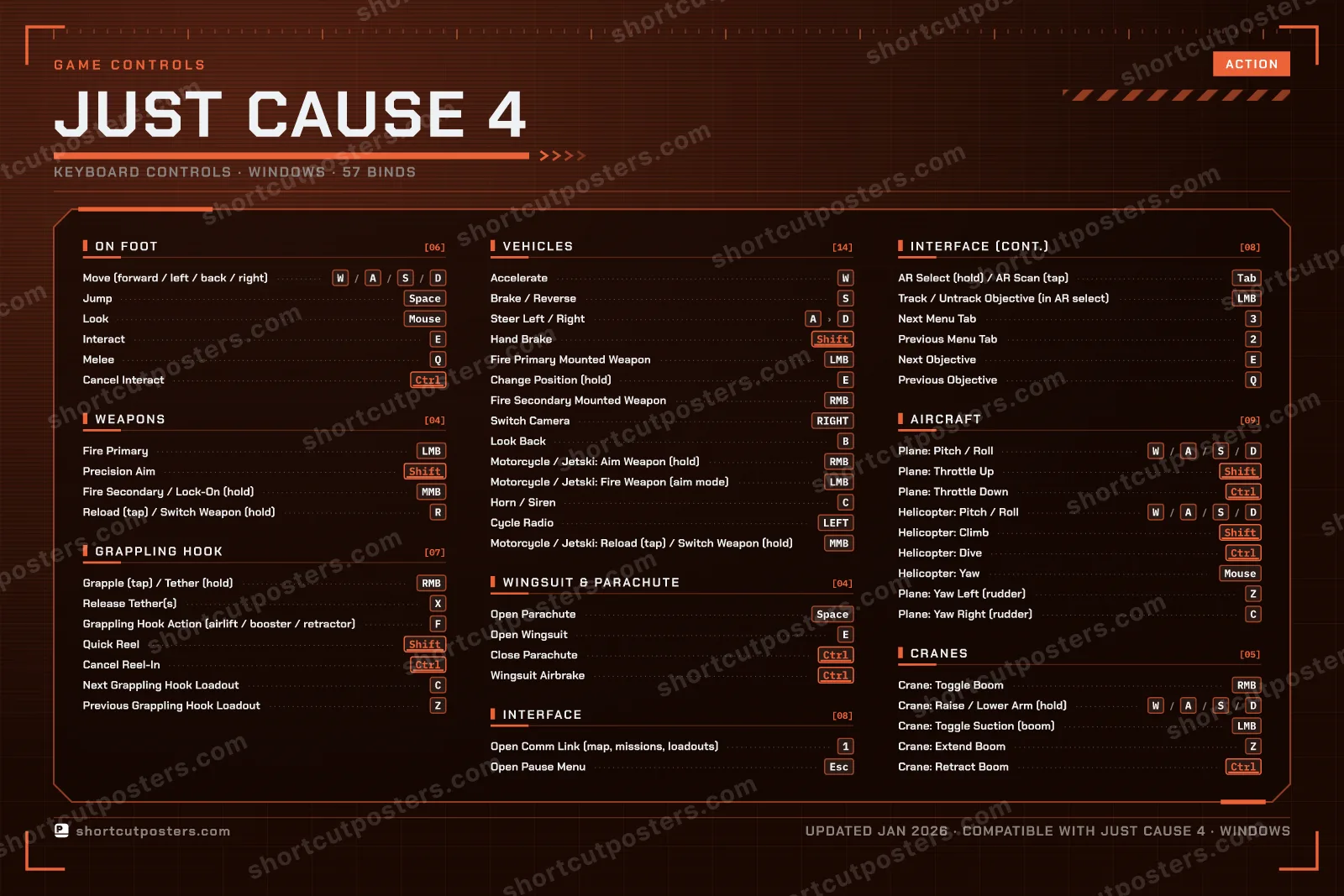
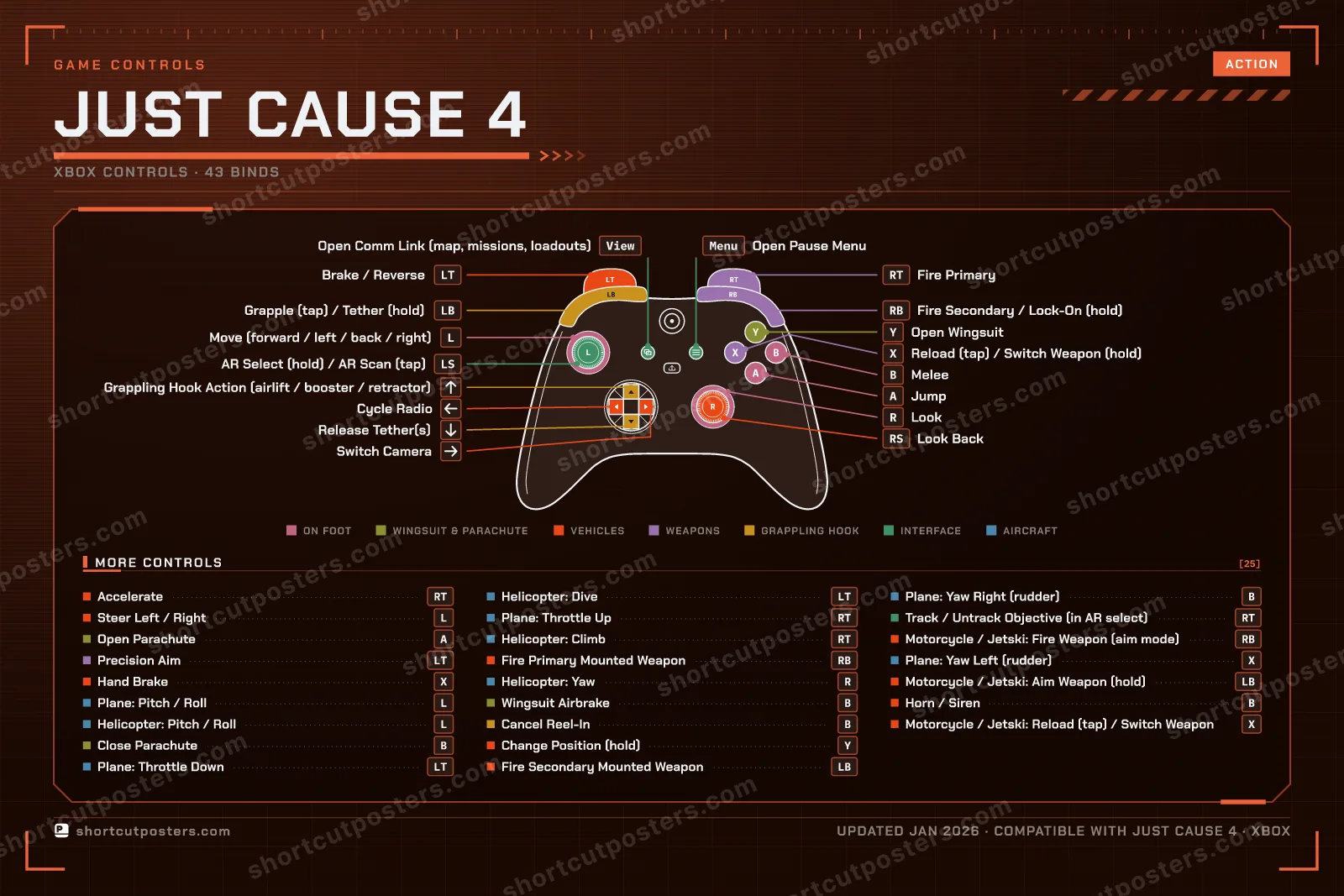
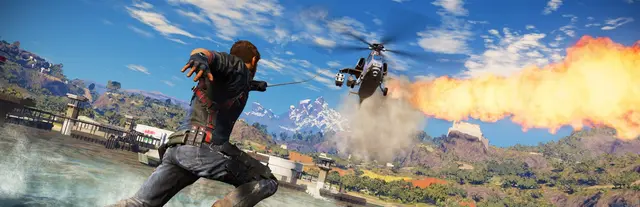
Just Cause 4 is Avalanche Studios' 2018 sequel, published by Square Enix and sold on Steam today as Just Cause 4 Reloaded, which drops Rico Rodriguez into the storm-battered South American country of Solís. These are the default keyboard and mouse bindings as the game's own remapping screen lists them, grouped the way the game groups them, with the Xbox layout from its built-in controller diagrams alongside. The customisable grappling hook is the heart of it: a tap grapples, a hold tethers, and F triggers whichever loadout is equipped.

Just Cause 4 official site ↗ View on Steam ↗

All Just Cause 4 controls

Layout

57 shortcuts

Vehicles 14

Action Shortcut
Accelerate W
Brake / Reverse S
Steer Left / Right AthenD
Hand Brake Shift
Fire Primary Mounted Weapon LMB
Change Position (hold) E
Fire Secondary Mounted Weapon RMB
Switch Camera RIGHT
Look Back B
Motorcycle / Jetski: Aim Weapon (hold) RMB
Motorcycle / Jetski: Fire Weapon (aim mode) LMB
Horn / Siren C
Cycle Radio LEFT
Motorcycle / Jetski: Reload (tap) / Switch Weapon (hold) MMB

Aircraft 9

Action Shortcut
Plane: Pitch / Roll WthenAthenSthenD
Plane: Throttle Up Shift
Plane: Throttle Down Ctrl
Helicopter: Pitch / Roll WthenAthenSthenD
Helicopter: Climb Shift
Helicopter: Dive Ctrl
Helicopter: Yaw Mouse
Plane: Yaw Left (rudder) Z
Plane: Yaw Right (rudder) C

Interface 8

Action Shortcut
Open Comm Link (map, missions, loadouts) 1
Open Pause Menu Esc
AR Select (hold) / AR Scan (tap) Tab
Track / Untrack Objective (in AR select) LMB
Next Menu Tab 3
Previous Menu Tab 2
Next Objective E
Previous Objective Q

Grappling Hook 7

Action Shortcut
Grapple (tap) / Tether (hold) RMB
Release Tether(s) X
Grappling Hook Action (airlift / booster / retractor) F
Quick Reel Shift
Cancel Reel-In Ctrl
Next Grappling Hook Loadout C
Previous Grappling Hook Loadout Z

On Foot 6

Action Shortcut
Move (forward / left / back / right) WthenAthenSthenD
Jump Space
Look Mouse
Interact E
Melee Q
Cancel Interact Ctrl

Cranes 5

Action Shortcut
Crane: Toggle Boom RMB
Crane: Raise / Lower Arm (hold) WthenAthenSthenD
Crane: Toggle Suction (boom) LMB
Crane: Extend Boom Z
Crane: Retract Boom Ctrl

Wingsuit & Parachute 4

Action Shortcut
Open Parachute Space
Open Wingsuit E
Close Parachute Ctrl
Wingsuit Airbrake Ctrl

Weapons 4

Action Shortcut
Fire Primary LMB
Precision Aim Shift
Fire Secondary / Lock-On (hold) MMB
Reload (tap) / Switch Weapon (hold) R

Sourced from youtube.com, support.eu.square-enix.com Last verified

Esc
F1
F2
F3
F4
F5
F6
F7
F8
F9
F10
F11
F12
`
1
2
3
4
5
6
7
8
9
0
-
=
⌫ Back
Tab
Q
W
E
R
T
Y
U
I
O
P
[
]
\
Caps
A
S
D
F
G
H
J
K
L
;
'
Enter ⏎
Shift
Z
X
C
V
B
N
M
,
.
/
Shift
Ctrl
Win
Alt
Space
Alt
Win
Menu
Ctrl
MMB · Fire Secondary / Lock-On (hold)
↑
←
↓
→

+ 2 more controls in the table below

57 default keybinds across 8 categories. Most can be reassigned in Just Cause 4's control settings. Switch to Gamepad to see Xbox, PlayStation and Steam Deck buttons side by side.

Unofficial reference. ShortcutPosters is not affiliated with, endorsed by, or sponsored by Just Cause 4. All product names, logos, and trademarks are property of their respective owners. See our licensing & trademark notice.

Put it on your wall

Just Cause 4, framed.
Every bind, razor-sharp.

Print-ready 36×24″ at 300 DPI. No watermark. Hang it, gift it, or turn it into a desk mat.

One file: the keyboard poster and the Xbox, PlayStation and Steam Deck controller posters.

Free preview
1600 px · watermarked
Print-ready
10 800 px · frame quality
  • Frame it36×24″, A1 or A2
  • Desk matany print shop
  • Gift itfor your duo or squad

Just Cause 4 controls poster preview
Just Cause 4 controller poster preview

Just Cause 4 controls — FAQ

What are the default controls for Just Cause 4?
Just Cause 4, a action game, uses 57 default keybinds across 8 categories — on keyboard and controller. The complete, up-to-date list is free to read on this page.
Can you remap Just Cause 4 controls?
Yes. These are the game's default bindings — nearly all of them can be reassigned from Just Cause 4's in-game control or key-binding settings.
Does Just Cause 4 support a controller?
Yes — Just Cause 4 has full gamepad support. The Xbox, PlayStation and Steam Deck button maps are shown on this page alongside the keyboard controls.
Which platforms do these Just Cause 4 controls cover?
These keyboard controls apply on Windows. Just Cause 4 also released on Xbox and PlayStation, and this page carries those controller bindings too. Most bindings are identical across platforms unless noted.
Is this an official Just Cause 4 resource?
No. This is an unofficial reference and is not affiliated with or endorsed by Just Cause 4 or its publisher. All trademarks belong to their respective owners.

Round 1🔥0⚡0Rookie

Find the key for the action shown.